Sat Feb 24 14:20:06 CST 2007
NetBSD pkg_add problem
Small problem today. I installed NetBSD 3.1 on mooloolaba, my Sun Sparcstation 20, yesterday. I was trying to use pkg_add to add some binary packages that I like, such as irssi, bash, and screen. Alas, no luck. The ftp logins kept failing, even though I had properly assigned the variable PKG_PATH to the correct one.
It turns out that the problem was that this version of NetBSD is not doing anonymous logins properly, and that was causing the FTP logins to fail. Even manual logins would fail, requiring you to use the user and pass commands to log in. The solution: Create a ~/.netrc file containing:
default login anonymous password youremailaddress@spamsucks.org
Here are some pictures:
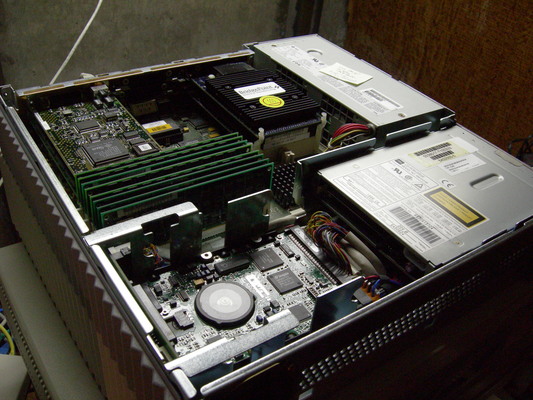
That is before the mods...
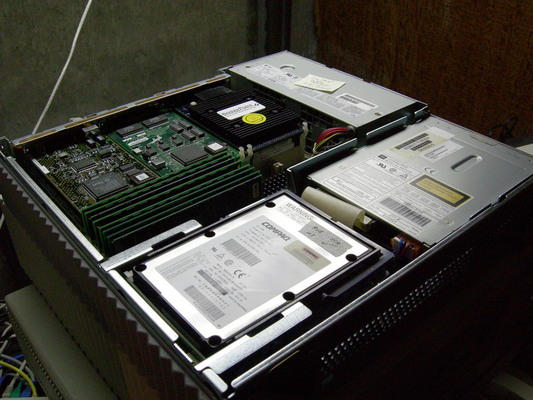
...and after. I took out the 4.3 GB SCSI-2 drive and installed a pair of 8.6 GB SCA SCSI-3 drives, which freed up the SCSI-2 connector so that I could finally connect the CD-ROM drive. (Sparcstations use proprietary CD-ROM drives - they are normal SCSI but the form factor is unique. They are quite short height-wise.) I also put in an Ultra-SCSI controller in a free SBUS slot (you can see it in the middle at the back). The SBUS card beside it is the HME "Happy Meal" Fast Ethernet controller; the built-in Ethernet is only 10BaseT and the HME is 100BaseTX. You can also see the topmost of the two Ross 180 MHz HyperSparc processors that I installed a few days ago. Underneath the HME NIC is the Low Cost Graphics cgsix framebuffer, which I am not currently using since mooloolaba runs headless.
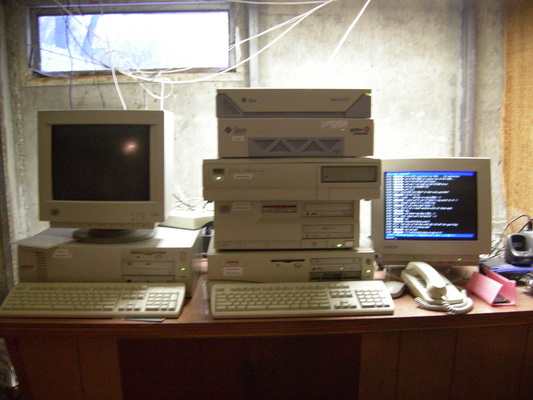
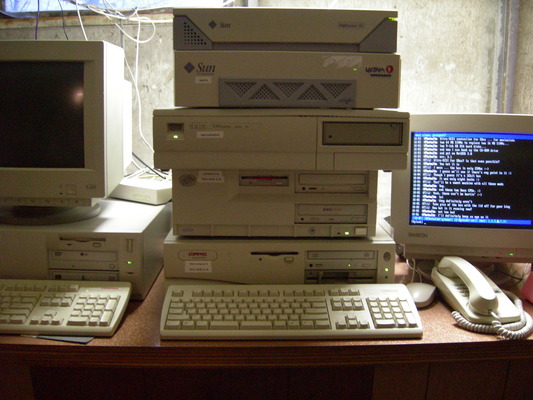
For general interest, here are some pictures of my "tower of computers": hobart (PII web/email/file server; home of this blog) at left; on the pile, top to bottom: mooloolaba (Sparcstation 20), moora (UltraSparc 1/170E, home of one of the Metanetwork IRC servers; maroochydore, my VAXstation 4000/60, running OpenBSD 4.0; canberra, an ancient 486sx25 with 32 MB of RAM that is soon to be retired; and devonport, my firewall, a Pentium 133. The latter two machines and moora run Debian Linux.
Fri Feb 23 16:31:28 CST 2007
Treo 680
I got a new cell phone this week: the Palm Treo 680.
This is a quad-band GSM phone (for Rogers Wireless or Fido. It also supports EDGE data speeds, which are quite a bit faster than GPRS. It's actually pretty zippy.
Initial impressions: I really like this phone. I still like PalmOS, but this phone has a much nicer screen than my Sony Clie PEG-TJ37, even though the screen is smaller. The quality of the phone is quite good. It has good-sounding audio (although slightly more obviously digital than my prior Motorola RAZR V3. I haven't given it a hard test under poor cellular conditions yet, but so far, so good.
My brother-in-law and a friend of mine both have the CDMA version of the Treo 650 and they both think that although it's a great PDA, it's a marginal phone. Steve Punter's review of the Treo 700wx seems to match their experience perfectly. However, the people I know with GSM Treos seem to be very happy with them. This might be a strong indicator that if you like Palm smartphones, you might prefer to use a GSM provider like Rogers, Fido, Cingular Wireless or T-Mobile USA rather than a CDMA provider. Of course, if you live outside Canada and the US, you are almost certainly going to be using GSM so the point is moot.
I'll report more later once I have more to say. So far, after 24 hours, I'm very happy with the phone.
Tue Feb 20 14:10:44 CST 2007
Chantal is Good
Chantal Kreviazuk was in Regina on Sunday night. Wow, was she ever good. Quite engaging, too. She really talked to the audience a lot.
My wife bothers me that I like women artists too much but I like Chantal's style. She plays piano on most of her songs, writes most of her own material and has a really distinctive voice.
In any event... two thumbs up. Two good concerts in only 6 days. Next concert: Jann Arden in May.
Tue Feb 13 15:14:55 CST 2007
Barenaked Ladies are Me
The Barenaked Ladies were in Regina last night.
Wow. What a good concert. And I've been to a few good concerts in my day. I might even say this was the best concert I've ever attended, in terms of fun value. (Sting and Annie Lennox in Saskatoon a few years ago was more of a spectacle, but less entertaining.)
If you missed it, you can download the actual concert for a small fee. I am going to download the Regina concert when it's available in a few days. I'd enjoy listening to it again.
Don't worry, I don't make a commission. :) (The Ladies don't even know I linked. At least, they didn't as of the time I wrote this. Hi Ed! Hi Kev! Hi Steve! Hi Tyler! Hi Jim! Happy birthday (yesterday)!)
I will certainly go to see them again when they come back to Regina.
Wed Feb 7 10:12:03 CST 2007
Access Digital Phone - update
Here is the news release about Access Digital Phone.
Wed Feb 7 09:33:20 CST 2007
Access DigitalPhone
Access Communications has officially launched its Digital Phone product today. $24.95 a month including some bells and whistles but not all.
As previously mentioned here I've had it since last Friday and it works well. Now everyone can have it. Even the riff raff. :)
Be sure to tell them that you think Visual Call Waiting should be included. Call Waiting and Call Display are, but they don't work together if you're already on a call. That costs extra, and it shouldn't.
I'd link right to the news release but it isn't working yet. I'm sure you can find it.
Sun Feb 4 16:03:58 CST 2007
Good reading for CFL fans
Three blog entries in one day. Stuff I meant to write about and never got around to. :)
A friend of mine, John Chaput, is an author. (He earns his living this way so he can claim title to the title.) Recently he wrote a very interesting book about the 2005 CFL season called the CFL Buzz Book.
What makes the book interesting is its statistical analysis of the season. I have seen similar books about other leagues, particularly Major League Baseball, but to see such a book about the CFL is quite new.
John writes with a very dry sense of humour that geeks like me particularly appreciate. If you take your sports seriously but still have a sense of humour about it, you will love John's writing style. I'm quite certain that some of John's remarks passed inches over my head (perhaps even feet), but I certainly caught a lot of them. They were quite entertaining.
It's hard to imagine a book of statistics that you will actually have trouble putting down, but here is such a book. I've already told John to reserve me a copy of the 2006 season version.
Sun Feb 4 12:05:47 CST 2007
Astronomically geeky
Celestia is the coolest program ever.
Basically, it's a universe simulator of sorts. You start in the solar system. You can surf around, looking at objects in the solar system from all angles. Lock on this object, follow that, and you can have some really neat views.
For example, hit enter and type "Iapetus". Hit C to centre. Hit G to go. There's Iapetus. No big deal. Use your mouse scroll wheel to make Iapetus smaller. Click on Iapetus and drag it to the lower right corner of your screen. Right click and drag on Iapetus until you see Saturn in the image. (It takes a bit of looking. Saturn isn't huge from Iapetus, but it's definitely visible.) If you can't find Saturn, hit enter and type "Saturn" and then c to centre. Find Iapetus again, click on it, then right click-drag as above until Saturn is in the frame. I like to put Saturn at the top left. Once you have them positioned pleasingly, click on Saturn and select "follow". Click on Iapetus and select "sync orbit". Then speed up time (L if memory serves; K slows it down; J reverses it). Cool huh?
The Windows version is excellent. The Linux version seems good too, although Ubuntu and Debian package an old version. I compiled the current 1.4.1 version from source and after some mucking about, got it to work. I also had to install a new video driver on my desktop to get good performance. You need 3D video to work. Unfortunately I can't get 3D video to work on my notebook.
Very fun... and free. There are also expansions available. I installed the two million star package, plus Eta Carinae, which is quite likely the next star in our stellar neighbourhood to go supernova. (It's far enough away that it probably already has gone supernova, but it takes 10,000 years for light to reach us from this system.
Anyway, download and try this great program.
Sun Feb 4 11:40:43 CST 2007
Access Digital Voice phone service
So I got Access Communications' new Digital Voice service installed on Friday. So far I must say that it's working extremely well.
The quality seems to be very similar to SaskTel's landline service. Of course, because of its greater dependence on local power, it may be somewhat more unreliable during very long power failures, but I suspect that it will be quite usable. Let's be honest; almost everyone has cell phones these days (and I have more than a few of those :) )...
So here is what I like, and what I don't like, so far:
- sound quality is very good
- 10-digit dialling works - e.g. you can dial 757-7111 for time of day, or you can dial 306-757-7111 and it still works. For local people this is not of huge consequence, but when your friend from Toronto uses your phone to dial a local number, it is a nice feature. Torontonians (and many other people) have to dial an area code on every call, local or long distance, and dialling with 10 digits is a habit for them. SaskTel does not support this feature on their landlines (at least not as of a few weeks ago), although both SaskTel Mobility and Rogers allow it on their cell phones. (Rogers requires it when you are out of your local area code, in fact.)
- modems work! I don't know if the Internet would ever be down and phone service would still be up, but if it happens, you can use Digital voice to place a modem call. I got 49,333 bps yesterday with a USR V.Everything modem (admittedly one of the best modems ever made, probably the best, but also a modem that tends to connect on the slow side because of its conservative design). Latency was quite reasonable.
- You can't use dial-around long distance providers, which is slightly annoying but not surprising - Primus doesn't allow it either. (I've been using Primus TalkBroadband for more than a year, and still have it connected for the time being.) The thing that makes it slightly annoying is that Access uses Allstream as its long distance provider, and its proposed North American toll rate of 7 cents per minute is rather high. (Yak charges 5 cents as a dial-around service and 3.5 cents if you make it your long distance provider.) On the other hand, Allstream's toll rate to the UK is only 4 cents, which is exceptionally good. (UK mobiles are 29 cents, which is reasonable.) Solution: get a number at Grand Central, add your contacts to your GrandCentral phonebook, and call them using the web portal; GrandCentral will call you at the number you specify and then connect your call. This will cost you nothing at all within North America, at least while the GrandCentral testing period persists, and apparently the thought is that you will still get 500 minutes per month for free afterward. (Quality seems very reliable by the way; I've been using GrandCentral for a few weeks. I have a 213 Los Angeles number.)
- Access has decided not to include Visual Call Waiting with the service, even though it includes both Call Display and Call Waiting. This is pretty stupid. Unless Access is planning a large package of additional calling features for a low flat fee (similar to SaskTel's Residential Calling Features Package), I can't imagine anyone would want to pay four or five dollars a month just to get Call Display when they are already on a call. Access, please include this for free - you don't want to seem cheap when people are comparing you to SaskTel, and it seems like a nickel-and-dime feature to not include, because its being missing will be a surprise to everybody until they actually get the service. People will expect it to be included. I suspect it will generate a lot of complaints, and Access should be concentrating on creating a lot of goodwill right now.
Anyway, so far, I'm reasonably happy. There are certainly some things that need to be fixed (why isn't call forwarding included? ... why are the long distance rates so high? ... why isn't there an unlimited long distance package available at a reasonable price, similar to what SaskTel and Primus offer? ...) but it's a new product and it will surely evolve.